
This guide covers everything a furniture brand or manufacturer needs to know about 3D furniture configurators: what they are, how they work, which furniture types benefit most, what results are achievable, and what to look for when choosing a platform. Examples throughout are drawn from live implementations by furniture brands using Expivi.
Contents
- What is a 3D furniture configurator?
- Why the furniture industry needs configurator technology
- Which furniture types benefit most
- Where CPQ software fits into furniture sales
- How a configurator reduces furniture returns
- From configuration to production: closing the loop
- Two furniture brands in practice: De Bommel & Heutink
- eCommerce brand vs. furniture manufacturer: different needs
- What to look for when evaluating configurator software
- Implementation: phases, workstreams and timelines
- Conclusion
What is a 3D furniture configurator?
A 3D furniture configurator is a software application, embedded in a webshop, dealer portal or in-store kios, that lets customers, sales staff or dealers interactively design a furniture product by selecting options (materials, dimensions, colours, modules, finishes) and see the result rendered as a live three-dimensional visual.
How it differs from a static product page
A standard product page shows one or a handful of pre-rendered images. A configurator responds dynamically to every selection. When a customer widens a sofa frame, the model widens. When they choose a different upholstery, the fabric updates immediately on the 3D model. When they add a module to a cabinet wall, it slots into place alongside the pieces already selected.
The connected version: 3D + CPQ + production output
At its most complete, a furniture configurator is not a visualisation tool in isolation. It is the front end of a connected system that links customer choices to pricing logic, order management and production workflows. This combination, 3D visualisation plus Configure, Price, Quote (CPQ) functionality plus back-end integration, is the model that furniture brands investing in this technology are increasingly adopting.
Platforms such as Expivi’s 3D configurator operate on this principle: real-time rendering connected directly to Visual CPQ software, so that every configured product comes with a validated price and a production-ready specification, without manual steps in between.
Why the furniture industry specifically needs configurator technology
Not every product category faces the same challenge online. For standard consumer goods, a photo and a size chart are usually enough. Furniture is structurally different, in four ways that matter for anyone selling or producing configurable pieces.
1. Product complexity that photography cannot cover
A sofa sold with five frame widths, twelve fabric families, four leg options and three armrest styles produces hundreds of distinct visual outcomes. Covering that range exhaustively with photography is economically unviable. Covering it with pre-rendered images produces assets that quickly become outdated and rarely reflect the customer’s chosen combination accurately.
2. High purchase stakes and costly returns
Furniture ranks among the highest-value and longest-considered purchases in the household. The expectation that the delivered product matches what was ordered is correspondingly high, and when it does not, the consequences are severe. Returning a large upholstered piece costs significantly more to process than returning a garment or a book: collection, inspection, repackaging, restocking or disposal all add up.
3. The conversion gap between showroom and webshop
Furniture showrooms convert well precisely because customers can touch, sit and measure in person. Without an equivalent capability online, confidence falls and abandonment rises. The webshop has always carried a structural conversion disadvantage relative to in-store, and configurator technology is the primary mechanism for closing it.
4. Manufacturing risk from manual order handover
For furniture manufacturers, the complexity of configurable products creates risk beyond the sale itself. Custom orders that arrive as emails, PDFs or spreadsheets require manual interpretation before production can begin. Each handover step introduces the possibility of error, a transposed dimension, a missed option, an incorrect material code, that surfaces at the most expensive point possible: after material has been cut.
Which furniture types benefit most from a 3D configurator
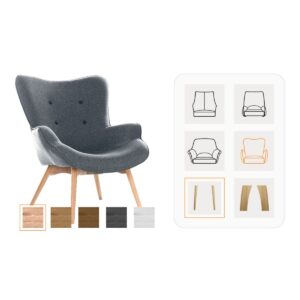
Not every furniture product needs configurator technology. A standard shelf in one size and one colour does not. The value of a configurator scales directly with the number of meaningful options a product carries, specifically, the degree to which those options affect visual appearance, price or production requirements.
The highest-value furniture categories for configuration
The furniture types that benefit most are those where the combination of dimensions, materials and structural choices creates a product that looks and costs materially different across configurations. The table below maps the most common categories to their primary configurator benefit:
| Furniture type | Key configurable dimensions | Primary benefit |
|---|---|---|
| Sofas & seating | Frame width, depth, upholstery, leg finish, armrest style | Expectation alignment; return reduction; fabric upsell visibility |
| Dining tables | Top material (wood, stone, ceramic), leg style, dimension | Material differentiation; premium positioning; dimension accuracy |
| Modular cabinets & storage | Module count, height, door style, handle, colour, dimension | Valid-combination enforcement; automated BOM output |
| TV units & media furniture | Width, hanging/standing, module type, wood texture, colour | Dimensional fit for specific wall sizes; module upsell |
| Beds & bedroom furniture | Size, headboard style, fabric/leather, storage option | Personalisation at scale; accurate material rendering |
| Contract & educational furniture | Module combinations, height, colour, structural options per spec | B2B self-service quoting; rule enforcement; bulk ordering |
| Kitchen furniture | Cabinet layout, worktop, door front, handle, dimension | Full-room visualisation; automated production bill of materials |
Starting with one product type
A practical approach, and the one most furniture brands take, is to begin with a single high-complexity product: typically the category that generates the most configuration-related customer service contacts, or the one with the highest return rate. Once the infrastructure and internal processes are in place, additional product lines can be added to the same configurator without rebuilding from scratch.
Where CPQ software fits into furniture sales and manufacturing
CPQ stands for Configure, Price, Quote. In a furniture context, it refers to the logic that sits behind the visual configuration experience and handles three functions: validating what can actually be built, calculating the correct price for the configured product, and generating a formal quote or order document.
Why furniture pricing is genuinely complex
A sofa does not have a single price. It has a price that varies based on frame width, fabric grade, whether a chaise extension is included, and which leg material the customer selects. A modular cabinet wall priced correctly must account for the number of modules, the door style applied to each, and whether accessories such as internal lighting are included. Manual pricing of every possible combination is not scalable and prone to error at every step.
The limitation of traditional CPQ tools for furniture
Generic CPQ software, typically designed for industrial or services sales, presents configuration through forms, dropdowns and specification tables. This works when the product is a service package or a technical component that the buyer can interpret from a spec sheet. It works poorly for furniture, where the appearance of the product is inseparable from the configuration decision.
A customer choosing between grade 3 and grade 4 upholstery does not benefit from a text label alone. They need to see the difference applied to their sofa, at the dimensions they have chosen, with the leg finish and armrest style already selected. The decision is visual; the tool that supports it needs to be visual too.
Visual CPQ: configuration logic integrated with real-time 3D
Visual CPQ combines the rules and pricing engine of traditional CPQ with a live 3D rendering layer. Every selection a customer makes is reflected simultaneously in the product visual and in the price display. The resulting quote is generated from the same configuration data, not from a separate pricing spreadsheet that has to be reconciled manually.
For furniture manufacturers with dealer networks, this has a specific operational benefit: dealers can generate accurate, branded quotes independently, without involving a central sales team for each request. The configuration logic, which options are valid, what they cost, how they combine, is encoded once and applied consistently across every user and channel.
How a 3D furniture configurator reduces returns
Returns are one of the most significant cost categories in furniture retail. The logistics of collecting, inspecting, repackaging and restocking a large upholstered piece are substantially more expensive per unit than in almost any other product category. Understanding the mechanism behind return reduction is therefore central to evaluating the financial case for configurator investment.
The expectation gap: the root cause of furniture returns
The primary driver of furniture returns is not fulfilment error, it is expectation mismatch. The customer receives a product that does not correspond to what they imagined when they placed the order. This happens because the tools available at purchase, static photos, small fabric swatches, centimetre dimensions on a spec sheet, do not give customers an accurate sense of what they are actually ordering.
Common mismatch scenarios include:
- A fabric that looks different at full scale on a sofa than it did as a 3 cm swatch square
- A piece that was the right size in abstract but wrong for the specific room and position intended
- A wood finish photographed under studio lighting that reads differently in natural domestic light
How the configurator closes the gap
A 3D furniture configurator addresses each of these mismatch sources directly:
- Material at full scale: Fabrics, wood grains, lacquered finishes and powder-coated metals are rendered as they appear on the actual product, applied to the full three-dimensional form, not to a swatch square.
A customer comparing bouclé and linen sees the difference on a 220 cm sofa, not a colour chip. - Dimensional accuracy with measurement overlay: Dimension lines on the 3D model give customers a spatial reference that product photography cannot.
A 220 cm sofa is visually distinguishable from a 260 cm version in a way that two separate product images are not. - AR placement in the customer’s own space: Augmented Reality mode lets customers use their phone camera to position the configured product in their actual room before purchasing.
This eliminates the most common source of dimensional mismatch: a product that was the right size in theory but wrong for the specific space.
Documented return rate reductions in furniture
Furniture brands implementing 3D configurators consistently report meaningful reductions in return rates. Heutink Groep, whose modular cabinet configurator was built on the Expivi platform, recorded a 20% reduction in product returns following implementation, a material improvement for a product category where each return carries significant logistics cost. Across furniture brands using Expivi, return rate reductions of up to 40% have been reported.
From customer configuration to production output: closing the loop
For furniture manufacturers, the value of a configurator extends well beyond the customer-facing experience. The configuration data that drives the visual and the price can, and in a well-integrated system, should, drive the production process directly.
Why manual handover is the weak point
In most furniture manufacturing operations without integrated configuration technology, the path from customer order to production start involves at least one manual handover step: a written order, an email, a spreadsheet or a PDF that a production planner must interpret, translate and re-enter into the manufacturing system.
Each step is a potential point of failure. A transposed dimension, an incorrect material code or a missed add-on option reaches the factory floor, where corrections after cutting or upholstery work are significantly more expensive than catching the error at source.
Automated production data from configuration output
When a configurator is integrated with ERP and PIM systems, the specification that leaves the configuration step, dimensions, materials, module combinations, quantities, is passed directly to the production system as structured data. No re-entry. No interpretation. No manual bridging between what was ordered and what is produced.
This includes automated generation of a Bill of Materials (BOM) where the production process requires it. For manufacturers operating at scale, eliminating manual handover has a compounding effect: as order volumes grow, the labour cost and error rate of manual processing would otherwise grow with them.
Integration with existing manufacturing and commerce stacks
A production-ready configurator integration should connect natively with the systems already in use. Common integration points for furniture manufacturers and retailers include ERP systems (such as SAP), eCommerce platforms (Shopify, Magento, WooCommerce, Shopware), PIM systems, CRM platforms (Salesforce) and dealer portals via custom API. An overview of available integrations is available on the Expivi integrations page.
The key principle: The specification that leaves the configurator should be the specification that reaches production, without any manual steps in between.
Two furniture brands in practice: De Bommel & Heutink
The following two cases illustrate how furniture brands have used 3D configurator technology to address specific operational and commercial challenges, and the results they achieved.
Case study · De Bommel Meubelen · TV unit configurator
De Bommel: higher average order value and online-showroom parity
De Bommel Meubelen is a Dutch furniture company with approximately 200 employees, producing customisable furniture distributed across the Netherlands and Belgium. After a successful dining table configurator, the company extended 3D configuration to a new TV unit range.
The challenge
De Bommel’s TV unit range offered extensive variation, length, module type, wood texture, colour combinations, that could not be communicated adequately through product photography. The company wanted customers to configure their exact unit from the moment the new range launched, without relying on showroom visits to build purchase confidence.
The solution
A 3D TV unit configurator was built and deployed on the De Bommel webshop, rendering all combination options in real time. Measurement lines overlaid on the 3D model give customers a direct spatial reference, reducing the likelihood of ordering a unit that does not fit the intended wall.
The results
“De Bommel’s customers are more confident buying TV units online due to the What You See Is What You Get effect. Upselling premium modules became materially easier within the visual configuration flow.”
Case study · Heutink Groep · Modular cabinet configurator
Heutink: 20% fewer returns and 15% more online sales for educational cabinets
Heutink Groep is a Dutch supplier of educational furniture and resources. Its modular cabinet range serves institutional buyers, school administrators and procurement managers, who require precise, error-free specifications before approving orders.
The challenge
Heutink’s existing cabinet sales process required extensive manual effort to generate quotes. The available tools could not effectively show all product options, and the quoting process depended heavily on the internal sales team, a bottleneck for institutional buyers who needed fast, accurate specifications.
The solution
A 3D modular cabinet configurator was built supporting up to 16 customisable modules, with real-time visualisation of height, colour and structural options. Integrated directly with Heutink’s online platform, institutional buyers can now complete their own configurations and proceed to order without involving the sales team.
The results
eCommerce furniture brand vs. furniture manufacturer: different needs, one platform
A 3D furniture configurator creates value for two distinct profiles in the furniture industry, but the problems it solves and the integrations it requires differ significantly between them.
Understanding which profile fits your organisation
| eCommerce furniture brand | Furniture manufacturer / dealer network | |
|---|---|---|
| Primary sales channel | Direct-to-consumer webshop | Dealer portal / B2B trade customers |
| Core challenge | Online conversion; return rate; expectation mismatch | Quote speed; order accuracy; production handover errors |
| Primary configurator user | End customer, self-service on webshop | Dealer or internal sales team |
| Key integration | eCommerce platform (Shopify, Magento, WooCommerce) | ERP (SAP), PIM, dealer portal or custom B2B system |
| KPIs that improve | Conversion rate, return rate, average order value | Quote turnaround time, order error rate, production efficiency |
| Further reading | Expivi for eCommerce → | Expivi for Manufacturers → |
When both profiles apply
Many furniture organisations operate across both categories simultaneously, a manufacturer with a direct-to-consumer webshop alongside a trade dealer channel, for example. In these cases, the same configurator and product data can serve both channels, with separate pricing logic, branding and user experience applied per context. This omnichannel deployment model prevents the need to maintain two separate configuration systems.
What to look for when evaluating furniture configurator software
The market for furniture configurator software ranges from lightweight visualisation tools to full-stack platforms with native ERP integration. The criteria below are the most consequential when evaluating options for a furniture-specific implementation.
Rendering quality and material accuracy
The fundamental promise of a furniture configurator is that the rendered product accurately represents what the customer will receive. This requires photorealistic rendering capable of handling fabric weave texture, wood grain variation, lacquered and metallic finishes, and glass. Tools that render in flat colour or low-fidelity 3D will not close the expectation gap that drives returns, which is the primary commercial reason for implementing a configurator in the first place.
Rule-based configuration logic
Furniture product logic is complex: some module combinations are structurally impossible, some fabrics are not available on particular frames, some dimensions exceed production capability. A configurator without rule-based logic will allow customers to configure products that cannot actually be built, creating problems at the order validation stage. Evaluate whether the platform lets you encode and manage these rules yourself, or whether every change requires developer involvement.
Real-time CPQ, price updates with every selection
Pricing must respond immediately as configuration choices change. A platform that requires a customer to request a quote after completing their configuration introduces friction and reduces conversion. The pricing logic should handle dimension-based pricing (where width or depth affects cost), material grade multipliers, add-on components, and trade or volume discounts for B2B channels.
ERP and eCommerce integration depth
A configurator that does not connect to existing systems creates a manual bridging problem. Every platform claims API capability, the relevant question is whether it offers a native integration for the specific systems in your stack. Custom API integrations require ongoing development effort to build and maintain. Ask which ERP, PIM and eCommerce platforms the vendor supports out of the box, and what data flows in each direction.
Augmented Reality (AR)
AR lets customers use a smartphone camera to place a rendered version of their configured product into their actual room. For furniture, where dimensional fit is a primary purchase concern, AR materially reduces the likelihood of returns. It should be evaluated as a standard feature requirement, not an optional add-on.
Catalogue management and scalability
Launching a configurator for one product is step one. Adding further products over time is where the operational sustainability of the platform becomes clear. Evaluate how new products are onboarded, how 3D assets are managed, and whether your team can make updates without specialist technical support between product launches.
Vendor evaluation checklist
| Criterion | What to ask the vendor |
|---|---|
| Rendering quality | Can I see a live demo with fabrics and wood grains similar to my product range? |
| Configuration rules | How are invalid combinations prevented? Can my team manage these rules directly? |
| CPQ / live pricing | Does pricing update in real time? How are dimension-based pricing rules set up? |
| ERP integration | Do you have a native connector for our ERP? What data does it pass, and in which direction? |
| AR capability | Is AR included as standard, or is it a separate module with additional cost? |
| Catalogue management | How does my team add or update products after launch? Is developer support required? |
| Implementation timeline | What is a realistic go-live timeline for a single product type in our stack? |
Implementation: phases, workstreams and realistic timelines
A furniture configurator implementation involves four workstreams, typically running in parallel. The relative weight of each depends on what the organisation already has in place and what the integration requirements are.
The four workstreams
1. 3D asset creation
Photorealistic rendering requires production-quality 3D models of each product in scope, covering all configurable variants, materials, colours, modules, structural options. Organisations that already hold 3D assets from previous rendering or design projects may be able to repurpose them. For organisations without existing assets, most configurator platforms handle 3D production as part of the implementation engagement.
2. Configuration logic development
The rules governing valid combinations, option dependencies and pricing responses must be defined and encoded in the platform. This requires input from the furniture brand’s product management team and, for manufacturers, from production engineering. The quality of the resulting configurator is directly determined by the quality and completeness of the product logic captured at this stage.
3. Platform integration
For eCommerce implementations, integration connects the configurator to the webshop platform so configured products flow through the existing checkout and order management process. For manufacturer implementations, integration connects to ERP and PIM systems so that order specifications flow automatically to production, without manual re-entry.
4. User experience and testing
The configuration flow, the order in which options are presented, how invalid choices are handled, how pricing is surfaced, must be tested with real product data before launch. Edge cases in product logic frequently surface during this phase, making thorough testing essential before the configurator goes live.
Typical implementation timelines
| Scope | Typical timeline |
|---|---|
| Single product, standard eCommerce integration | 2–4 weeks |
| 2–5 products, standard integration | 4–8 weeks |
| Full catalogue with ERP integration (SAP or equivalent) | 8–14 weeks |
| Omnichannel deployment (webshop + dealer portal + in-store) | 10–16 weeks |
The staged approach: why starting with one product is the right move
The most effective approach for most furniture brands is to begin with a single high-value, high-complexity product, the category generating the most configuration-related customer service contacts, or the highest return rate. This delivers measurable results quickly, reduces implementation risk, and builds the internal familiarity with the platform needed to scale efficiently to additional products.
Expivi’s implementation process follows five structured stages, introduction, assessment, development, integration, and launch, with continuous support throughout and after go-live. Further detail on the process is available on the How to Start page.
Conclusion
The furniture industry’s product complexity, the dimensions, materials, modules and finishes that define most configurable pieces, makes it uniquely well suited to 3D configurator technology. The same complexity that makes furniture difficult to sell online effectively is precisely what makes a connected configuration, pricing and production platform valuable.
The three problems configurator technology addresses simultaneously
Furniture brands and manufacturers that implement configurator technology solve three distinct operational challenges at once:
- The conversion challenge: customers who cannot see and understand what they are ordering convert at lower rates and abandon more often.
- The returns challenge: customers who order based on incomplete information return at higher rates, with significant logistics costs per unit.
- The production challenge: custom orders that pass through manual handover steps accumulate errors that surface at the most expensive point to fix them.
Where to start
For furniture brands evaluating configurator technology, the most useful next step is a demonstration on a comparable furniture product type, not a generic platform demo, but a walkthrough that shows how a sofa, a cabinet or a dining table in your specific range would work within the configuration, pricing and production flow.
The furniture brands using Expivi today, among them De Bommel Meubelen and Heutink Groep, began with a single product type and scaled from there. In both cases, measurable results on the initial product were achieved within weeks of launch.
See what a 3D furniture configurator looks like for your products
In 15 minutes, Expivi’s team can walk through your specific product range and show you how configuration, live pricing and production output would work for your situation.
±15 minutes · No commitment · Suitable for brands of any size